

Running a clinic in 2026 means doing more with less. Payers keep tightening their rules, Medicare payments keep sliding, and the staff who handle billing are harder to find and keep.
In the middle of all this sits a tool that quietly decides whether a practice gets paid on time or watches revenue slip away. That tool is medical practice billing software, and the clinics treating it as a core part of operations are pulling ahead of the ones still leaning on manual work. The gap between those two groups is widening fast.
Quick Queries:
| Question | Quick answer |
| What does this software do? | It manages a claim from check-in to payment, automating submission, error checks, eligibility, and denial tracking. |
| Why does it matter in 2026? | Denials are climbing and payments are shrinking, so manual billing can’t protect your margins anymore. |
| What’s the biggest payoff? | Cleaner claims that get paid faster, which steadies cash flow and frees staff from constant rework. |
| Which clinics benefit most? | Small and mid-size practices with thin margins and limited billing staff feel the gain fastest. |
What Every Provider Should Know
- A denied claim costs you twice, once in the payment you miss and again in the hours your team spends reworking it.
- Good software cuts avoidable denials by scrubbing claims and checking coverage before anything reaches the payer.
- Faster, cleaner claims shorten your payment cycle and protect cash flow as reimbursement pressure builds.
- The right setup depends on your size, your specialty, and how much billing work you want to keep in house.
Why 2026 is Squeezing Clinic Margins
A 2024 MGMA Stat poll found that 60% of medical group leaders reported higher claim denial rates than they saw during the same period the year before. That figure is worth pausing on because it means rising denials aren’t a problem for a few unlucky practices; they’re the norm across most of the field. Every denied claim costs you twice: once in the payment you don’t receive, and again in the staff hours your team spends reworking and resubmitting it.
The pressure doesn’t stop at denials. Medicare’s physician payment rates have kept drifting downward, so the same visit brings in less than it did a few years ago. Lower payments make the problem worse, especially for smaller practices that don’t have the cash flow to absorb repeated denials. Add in staffing shortages in billing roles, and you get a setup where manual processes simply can’t keep up with the volume and the rules.
What Medical Practice Billing Software Actually Does
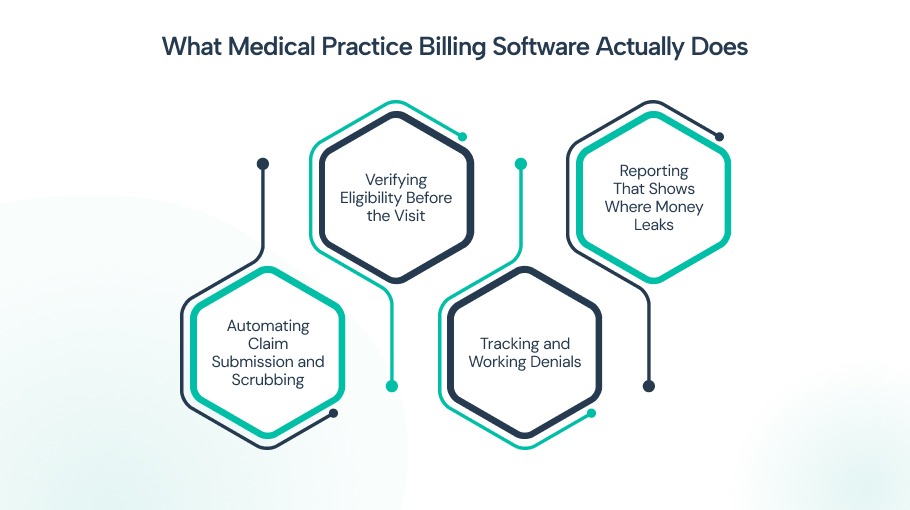
In plain terms, medical practice billing software is a system that manages a claim from the moment a patient checks in to the day the payment posts, automating the steps in between. It helps to get specific here, because “billing software” can mean very different things depending on the vendor. The strongest systems do four things especially well.
Automating Claim Submission and Scrubbing
Instead of staff keying claims in by hand, the software builds them from the visit data and checks each one against payer rules before it goes out. This catches the small errors, a wrong modifier, a missing field, a mismatched code, that cause so many denials in the first place.
Verifying Eligibility Before the Visit
Coverage problems are one of the biggest reasons claims get rejected. Good software checks a patient’s insurance status automatically, often days ahead of the appointment, so your front desk knows what’s covered before the patient walks in.
Tracking and Working Denials
When a claim does get denied, the system flags it, sorts it by reason, and routes it to the right person fast. That matters because appeal windows are short, and a denial sitting in someone’s inbox for three weeks is often a denial you’ll never recover.
The best systems go a step further and use AI to catch the patterns behind repeat denials, which is where a smarter denial management process really pays off
Reporting That Shows Where Money Leaks
You can’t fix what you can’t see, and that’s exactly where reporting earns its keep. Clear dashboards show you which payers deny the most, which codes trigger problems, and where claims stall, so you can fix the cause instead of chasing each symptom.
A platform like CureAR pulls these views into one place so your team isn’t stitching reports together by hand.
For a fuller breakdown, see how medical billing software works.
How the Right Software Speeds up Your Cash Flow

Faster payment is where the financial impact shows up most clearly. When claims go out clean the first time, payments arrive sooner, and your days in accounts receivable drop. Billing software for clinics shortens that whole cycle by removing the manual steps that slow it down and introduce errors.
There’s a quieter benefit too. Automation frees your billing staff from repetitive data entry, which lets them spend time on the work that actually needs a human, like complex appeals and payer negotiations. To be honest, no software erases every denial, and any vendor promising a zero denial rate is overselling. What good software does is cut the avoidable denials sharply and give your team a fighting chance on the rest.
Signs It’s Time to Rethink Your Billing Setup
Plenty of clinics sense something’s off with their billing but can’t point to the cause. A few patterns tend to show up before the numbers turn ugly, and catching them early saves you a painful quarter.
Watch for these:
- Your denial rate sits above 5%, or you don’t actually know your denial rate, which is its own warning sign.
- Claims regularly go out several days after the visit, because the longer that lag, the slower the payment lands.
- Staff spend hours each week retyping the same information across systems that don’t talk to each other.
- You learn about coverage problems after the visit instead of catching them before it.
- Your team keeps appealing the same denial reasons, which points to a process gap upstream rather than bad luck.
If two or more of these sound familiar, the problem usually isn’t your people. It’s the tools they’re working with, and that’s a fixable problem.
Comparing Your Options
Not every clinic needs the same setup, and the right choice depends on your size, your specialty, and how much of the billing work you want to keep in house.
Here’s how the main options stack up.
| Option | Best for | Strengths | Trade-offs |
| Standalone billing tool | Small practices that already like their EHR | Lower cost, focused features, quick to learn | Limited integration, more manual handoffs between systems |
| Integrated practice management suite | Clinics wanting scheduling, billing, and records together | Smooth data flow, fewer errors, single login | Higher upfront cost, longer setup |
| Fully outsourced RCM | Practices short on billing staff | Expert team handles the work, less to manage internally | Ongoing percentage fee, less direct control |
Many growing clinics land on an integrated approach, where healthcare practice management software ties scheduling, clinical records, and billing into a single workflow. That connection cuts the gaps where information gets lost between systems, and lost information is where a lot of denials begin.
Compliance and a Smoother Patient Experience
Billing rules change often, and falling behind can mean failed audits, fines, or clawbacks. Modern software updates its coding and compliance checks as payer and government rules shift, which takes a heavy burden off your team and lowers your risk of a costly mistake.
The patient’s side matters just as much, even if it’s easy to overlook. When billing is accurate, patients get clear statements, fewer surprise bills, and easier ways to pay, and that trust shows up in whether they come back.
A clinic that bills cleanly tends to be a clinic patients feel good about, which is a connection most practice owners underrate.
The Bottom Line for Clinics
The clinics pulling ahead in 2026 aren’t necessarily the ones seeing more patients. They’re the ones that have stopped letting preventable denials and slow payments eat their margins. Strong medical practice billing software sits at the center of that shift, turning a reactive scramble into a steady, predictable revenue cycle that supports both your finances and your patients.
If you’re weighing a change, start by pulling your last quarter’s denial report and counting how many of those denials were avoidable. That single number will tell you more than any sales pitch.
It also provides a practical benchmark for evaluating whether a revenue cycle platform such as CureAR can help reduce denials, improve collections, and free your team to focus on higher-value work.
Frequently Asked Questions
Most practices see cleaner claims within the first billing cycle, but the bigger gains in cash flow usually take two to three months as your team settles into the new workflow. The exact timeline depends on your claim volume and how messy your starting point was. Don't expect overnight magic, but do expect a clear trend.
Not at all, and smaller clinics often feel the benefit faster. They have less cushion to absorb denials and fewer staff to throw at rework. The cost has also dropped a lot, so the math now works for solo and small group practices that couldn't justify it a few years ago.
It usually doesn't replace people, it changes what they do. Instead of typing claims and fixing rejections all day, your team shifts to higher value tasks like appeals and payer follow up. Most clinics keep their staff and simply get more out of them.
Buying for features they'll never use while skipping the training that makes the basics work. A simpler system your team actually uses beats a powerful one they avoid. Spend real time on onboarding, because that's where the value gets unlocked.
Most modern platforms connect with common EHRs and clearinghouses, though the smoothness varies. Before you commit, ask the vendor to show the exact integration with your current tools rather than a generic demo. That one step saves a lot of headaches later.