Nobody starts researching billing software because they’re bored. Usually, something specific is going wrong, such as denials are piling up, a biller quits, and nobody has trained a replacement, or the spreadsheet system that worked fine at 300 claims a month is falling apart at 1,200.
Once you’re in that spot, a medical billing software comparison turns into a much bigger task than it should be, mostly because every vendor site swears their tool is the best fit for everyone. It isn’t. A two-provider family practice and a twelve-physician orthopedic group are solving completely different problems, even if both are technically “shopping for billing software.”
This guide starts with the questions you should be asking before you look at a single product name, then works through what’s actually on the market and how it splits by practice type.
Quick summary: A useful medical billing software comparison starts with practice size, specialty complexity, budget, and how well a platform talks to your existing EHR, not with brand names. Get those four right, and lower denial rates and better collections tend to follow.
What to Look at Before You Start Comparing Options
It’s tempting to skip straight to a list of software names. Resist that, at least for ten minutes, because the list means nothing without knowing what you’re matching it against.
Practice Size and Claim Volume
A solo provider filing a few hundred claims a month is not shopping in the same category as a group pushing several thousand. Smaller practices tend to do better with simpler platforms that fold billing, scheduling, and basic reporting into one system, while larger groups need something built to hold up under volume without needing extra staff just to keep it running.
Specialty and Coding Complexity
Dermatology, physical therapy, and cardiology all lean on different code sets, modifiers, and payer quirks, so a platform that’s excellent for one specialty can be mediocre for another. Ask specifically whether a vendor has built-in templates and coding logic for your field before you get further into a demo.
Budget and Pricing Structure
Flat monthly fee, percentage of collections, per-provider pricing, none of these is inherently the better model, but each rewards a different kind of practice. Run the real monthly cost against your current collections before you decide, because the sticker price rarely tells the whole story.
Integration With Your Current Systems
If billing software and your EHR don’t talk to each other cleanly, someone on your front desk ends up typing the same patient data twice. That’s not just annoying, it’s where a lot of avoidable errors creep in, so confirm EHR and clearinghouse compatibility before you sign, rather than after.
A List of Medical Billing Software Options Worth Knowing
- CureAR leads a newer category of medical billing software built specifically around claims accuracy and denial prevention. It gives small and mid-size practices automation tools that cut reliance on a large in-house billing team, which matters most for groups without the headcount to chase every denial manually.
- AdvancedMD fits mid-size and larger practices that want AI-assisted claim scrubbing and detailed analytics; smaller teams sometimes find the learning curve steeper than they expected.
- DrChrono works well for mobile-first and small practices thanks to its iPad-friendly interface, though it doesn’t integrate as smoothly with full revenue cycle workflows as some competitors do.
- RXNT appeals to smaller practices for its transparent, predictable pricing, but it’s thinner on the advanced reporting that larger groups eventually want.
- athenahealth and CureMD target practices that want billing bundled tightly with their EHR, which cuts down on the double data entry problem mentioned above.
To learn more, read Why Medical Billing Software Is a Game-Changer for Clinics in 2026.
Side by Side: How Top Platforms Stack Up
| Platform type | Best fit | Strength | Watch out for |
| All-in-one EHR plus billing | Small to mid-size practices | Reduces double data entry | Can limit flexibility if you switch EHRs later |
| Billing-only, specialty-focused | Practices with complex coding needs | Deep specialty templates | May need a separate EHR integration step |
| AI-driven claim scrubbing platforms | Practices with rising denial rates | Catches errors before submission | Higher upfront learning curve for staff |
| Budget, flat-fee platforms | Solo and small practices | Predictable monthly cost | Fewer advanced analytics features |
Why a Medical Billing Software Comparison Matters for Denials and Revenue
A January 2026 MGMA Stat poll found denials and appeals are the single biggest revenue cycle leak practices reported today, named by 48% of respondents, ahead of front-end eligibility issues and coding errors combined (MGMA, 2026).
That’s not a small edge case; that’s nearly half the industry pointing to the same weak spot. It lines up with what most billing teams already sense day to day: the software you use to catch errors before a claim goes out has a direct line to how much revenue actually reaches your practice.
A platform with strong upfront claim scrubbing catches missing modifiers and eligibility gaps before submission, so fewer claims boomerang back denied. Over time, that shows up as shorter days in accounts receivable and a cash flow that’s easier to plan around.
Best Medical Billing Software Comparison by Practice Type
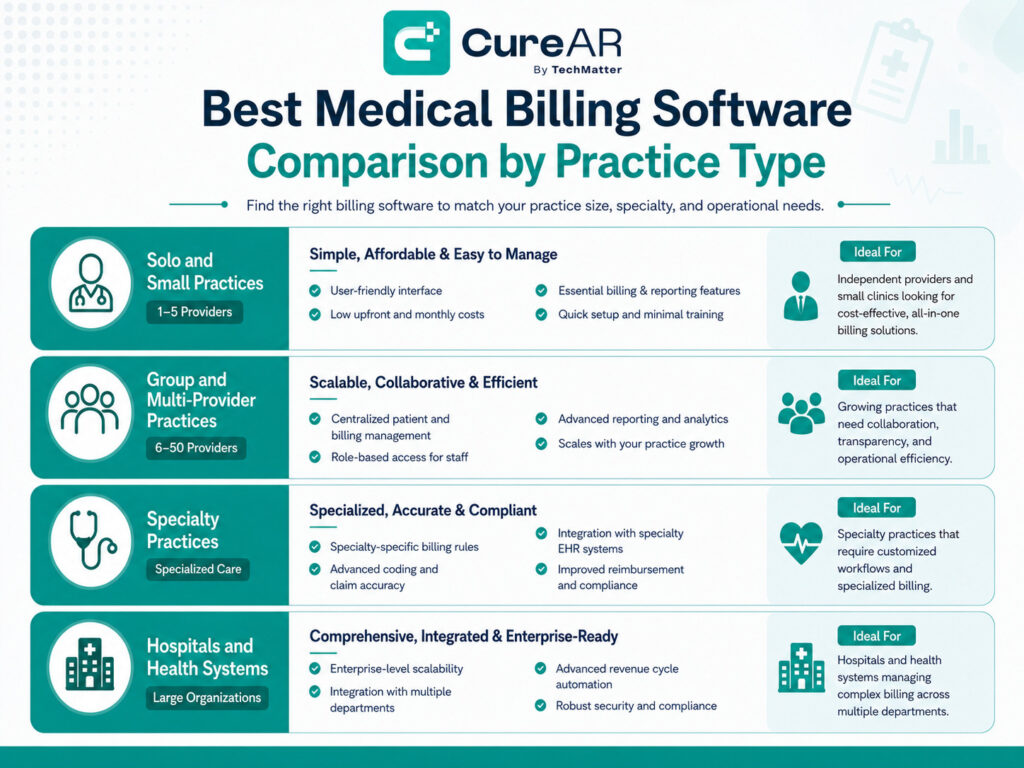
There isn’t one best medical billing software comparison answer, because “best” changes depending on what kind of practice is asking.
Solo and Small Practices
Solo providers usually do best with something simple, an all-in-one platform bundling scheduling, EHR, and billing, without a steep price tag or a months-long onboarding process.
Group and Multi-Provider Practices
Groups need software that can handle higher claim volume across multiple providers and schedules, plus reporting that breaks performance down by provider and by payer instead of lumping everything together.
Specialty Practices
Specialty groups should prioritize built-in coding support for their field first. Generic templates tend to miss the specific denial triggers that show up in fields like behavioral health or orthopedics, and that gap is where the real cost hides.
Hospitals and Health Systems
Larger systems generally need enterprise-grade platforms with deep EHR integration across multiple departments and locations. The setup takes longer, sometimes a lot longer, but the alternative, stitching together smaller tools, tends to cost more in the long run.
Conclusion
The right platform comes down to matching your practice’s size, specialty, and budget to a system built for that exact combination, not chasing whichever name ranks first on Google.
A careful medical billing software comparison takes the guesswork out of that call and keeps the focus where it belongs: on what actually improves your collections and lowers your denial rate.
If you’re in the middle of weighing options right now, it’s worth taking a closer look at how a platform like CureAR handles claims accuracy for a practice your size before you commit to anything.
Frequently Asked Questions
Practice size and specialty complexity usually outweigh price. A cheap platform that doesn't support your specialty's coding needs can end up costing more in denied claims than a slightly pricier one built for your workflow.
Not really. Small practices tend to benefit more from simplicity and predictable pricing than from deep analytics, while larger groups need reporting granular enough to manage multiple providers and locations at once.
Somewhere between 30 and 90 days is typical, depending on data volume and how tangled your current workflows are. Practices that time the switch for a slower season generally have an easier go of it.
Yes, especially platforms with built-in claim scrubbing that flag coding errors and eligibility issues before a claim goes out. It won't get denials to zero, honestly, nothing does, but it does cut the preventable ones that come from simple front-end mistakes.
Depends what "works" means. If your team is buried in manual denial follow-up or your reporting can't answer basic financial questions on demand, that's usually a sign the current platform has quietly stopped keeping pace.