Your billing system is not just a back-office tool, but an engine that keeps your practice financially alive. Billing staff face denied claims and slow reimbursements, often chasing payers for weeks. These are not just frustrating but costly as well.
The American Medical Association reports that average-sized health systems received over 110,000 claim denials in a single year due to prior authorization and other billing issues.
Today, healthcare providers face a big choice: stick with in-house (on-premise) billing software or move to cloud-based medical billing software. This is not just a tech decision, but it affects your cash flow, your team’s daily work, and your ability to grow.
This guide breaks down both models so you can choose the one that fits your practice, your budget, and your goals.
What is Cloud-Based Medical Billing Software?
Web-based billing platforms are hosted on remote servers and accessed through the internet. You do not install anything on your local computers. You log in from any device, anywhere.
Here’s what makes it different:
- No local installation or hardware setup needed
- Priced on a subscription model (monthly or annual)
- Updates, backups, and security patches happen automatically
- Works well for multi-location clinics and remote billing teams
Cloud billing tools also connect easily with Electronic Health Records (EHRs) systems, clearinghouses, and reporting tools. This means you get a fuller picture of your revenue cycle without jumping between platforms.
What is In-House (On-Premise) Billing Software?
system. Your IT team manages it.
Key characteristics include:
- Full ownership and control over your infrastructure and data
- Typically, a one-time licensing cost plus ongoing maintenance fees
- Requires internal IT staff to handle updates, backups, and troubleshooting
- Common in large hospitals and health systems with dedicated IT departments
In-house systems give you more control, but that control comes with more responsibility and cost.
Key Differences at a Glance
| Feature | Cloud-Based Software | In-House Software |
| Deployment | Web-based, remote servers | Local/on-premise servers |
| Cost Structure | Monthly or annual subscription | High upfront + ongoing costs |
| Accessibility | Anywhere with internet access | Limited to the office or VPN |
| Scalability | Add users and features easily | Hardware upgrades required |
| Maintenance | Handled by the vendor | Requires an in-house IT team |
| Data Security | Vendor-managed, HIPAA-ready | Full internal control |
| Updates | Automatic and continuous | Manual, often delayed |
| Downtime Risk | Internet outage dependent | Hardware failure dependent |
Cost Analysis: Upfront vs Long-Term Investment
Cost is usually the first factor that practices look at.
Here is an honest breakdown:
Cloud-Based Costs
- Low upfront cost and no servers or hardware to buy
- Predictable monthly or annual subscription fees
- Watch for hidden costs: add-on features, extra user seats, or premium support
In-House Costs
- High initial investment with servers, licenses, and setup fees
- Ongoing IT salaries, maintenance contracts, and upgrade costs
- Hardware replacement every few years adds to the total
When you look at Total Cost of Ownership (TCO) over 3 to 5 years, cloud-based systems often come out ahead for small to mid-sized practices. In-house systems can make financial sense for large organizations that already have a strong IT team in place.
Breaking Down the Real Differences
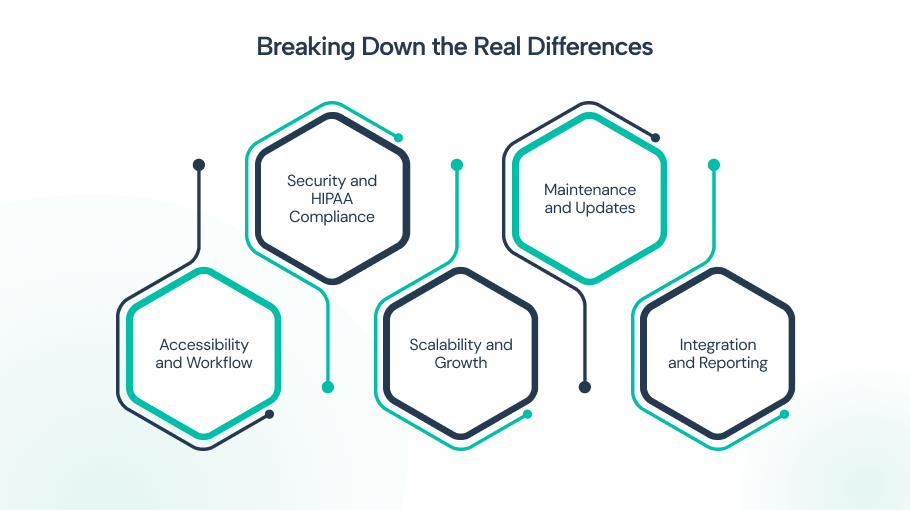
This is where the decision becomes practical. Beyond surface-level features, the real differences show up in how each system supports your day-to-day operations, scales with growth, and handles risk. Breaking these factors down helps you see which model actually aligns with how your billing team works.
1. Accessibility and Workflow
Think about how your billing team works. Are they in the office every day? Do you use a remote billing service?
Cloud-based billing tools let your team log in from anywhere. This supports remote work, outsourced Revenue Cycle Management (RCM) teams, and real-time collaboration between coders, billers, and front-desk staff.
In-house software usually ties your team to the office or requires a Virtual Private Network (VPN) to access remotely. This slows things down and adds an extra layer of IT management.
Faster access to billing data leads to quicker claim submissions and shorter payment cycles. That has a direct impact on your bottom line.
2. Security and HIPAA Compliance
Both models can meet HIPAA standards. But how they get there is different.
Cloud-based platforms handle encryption, regular security audits, and compliance updates on your behalf. Reputable vendors are HIPAA-compliant by design. The main risk is that you are trusting a third party with your patient data.
In-house systems give you direct control over your data. But that control is only as strong as your internal security setup. Old hardware, outdated software versions, and undertrained staff are common vulnerabilities
According to the U.S. Department of Health and Human Services (HHS), most healthcare data breaches stem from unauthorized access and hacking, not just cloud vulnerabilities.
This trend is reflected in real-world incidents like the Change Healthcare cyberattack, which exposed sensitive data and disrupted operations across the healthcare ecosystem.
3. Scalability and Growth
If your practice is growing, adding locations, hiring more providers, or seeing higher patient volume, your billing system needs to grow with you.
Online medical billing platforms handle this well. You can add users, locations, and features without touching any hardware. In most cases, it is as simple as upgrading your plan.
In-house systems require physical upgrades. It requires new servers, additional IT staff, and longer timelines. For a growing practice, this can create bottlenecks right when you need speed the most.
4. Maintenance and Updates
Billing rules change constantly. ICD-10 codes get updated. Payer policies shift. A system running on old rules can lead to denied claims and lost revenue.
Cloud-based billing tools push updates automatically. When CMS changes a billing code requirement, your system updates overnight without any action on your end.
In-house systems require manual updates. If your IT team is slow or overwhelmed, you might be billing with outdated rules for weeks. That is a costly gap.
5. Integration and Reporting
Your billing software should talk to the rest of your tech stack, especially your EHR and your clearinghouse.
Cloud-based medical billing software is built for this. Most platforms offer open APIs and pre-built integrations with major EHRs, analytics dashboards, and claim scrubbing tools. This improves revenue visibility and reporting.
In-house systems often need custom integrations, which take time and money to build and maintain. If you want a full view of your revenue cycle, linking your billing software to a strong claim management software can help bridge that gap.
Which One is Right for Your Practice?
If you are a small to mid-sized practice, growing fast, or working with remote teams, cloud billing systems are likely the better fit. If you are a large hospital system with a dedicated IT department, strict data governance policies, and high customization needs, in-house may still make sense.
If you are somewhere in the middle, look at your 3-year financial plan and ask: Can we handle the IT load, or would we rather focus on patient care?
Final Thoughts
The choice between cloud-based and in-house medical billing software comes down to three things: your budget, your team’s setup, and how fast you plan to grow.
AI-powered, cloud-based platforms like CureAR offer lower startup costs, easier access, and less IT burden. In-house systems offer control and customization for organizations that can support them.
Whatever you choose, make sure your system stays current, integrates with your EHR, and gives your billing team the tools they need to submit clean claims the first time. That is what turns a billing system into a real revenue asset.
Frequently Asked Questions
Yes, most reputable cloud-based medical billing platforms are built to meet HIPAA requirements.
They use encryption, access controls, and regular security audits. Always verify a vendor's Business Associate Agreement (BAA) before signing up.
A good vendor will give you data export options in your contract. Always ask about data portability and backup policies before committing to any cloud-based billing platform.
Yes. That is one of the biggest advantages of cloud-based billing tools. Subscription pricing means you pay for what you use, with no large upfront hardware costs.
Many vendors offer plans designed specifically for solo providers and small clinics.
Migration timelines vary, but most practices complete the switch in 4 to 12 weeks. The process includes data migration, staff training, and integration setup.
Working with a vendor that provides onboarding support makes this much smoother.
Yes. Because it runs on local servers, in-house software does not depend on an internet connection.
This can be an advantage in areas with unreliable connectivity, but it limits remote access for your billing team.